

Module 7 · Unit 4
Explore how shared documents, task boards and communication channels support clear coordination on HVAC projects.
| The aimEveryone can see what is happening, who is responsible, and what must happen next - without chasing updates across calls, texts and notebooks. |
|---|
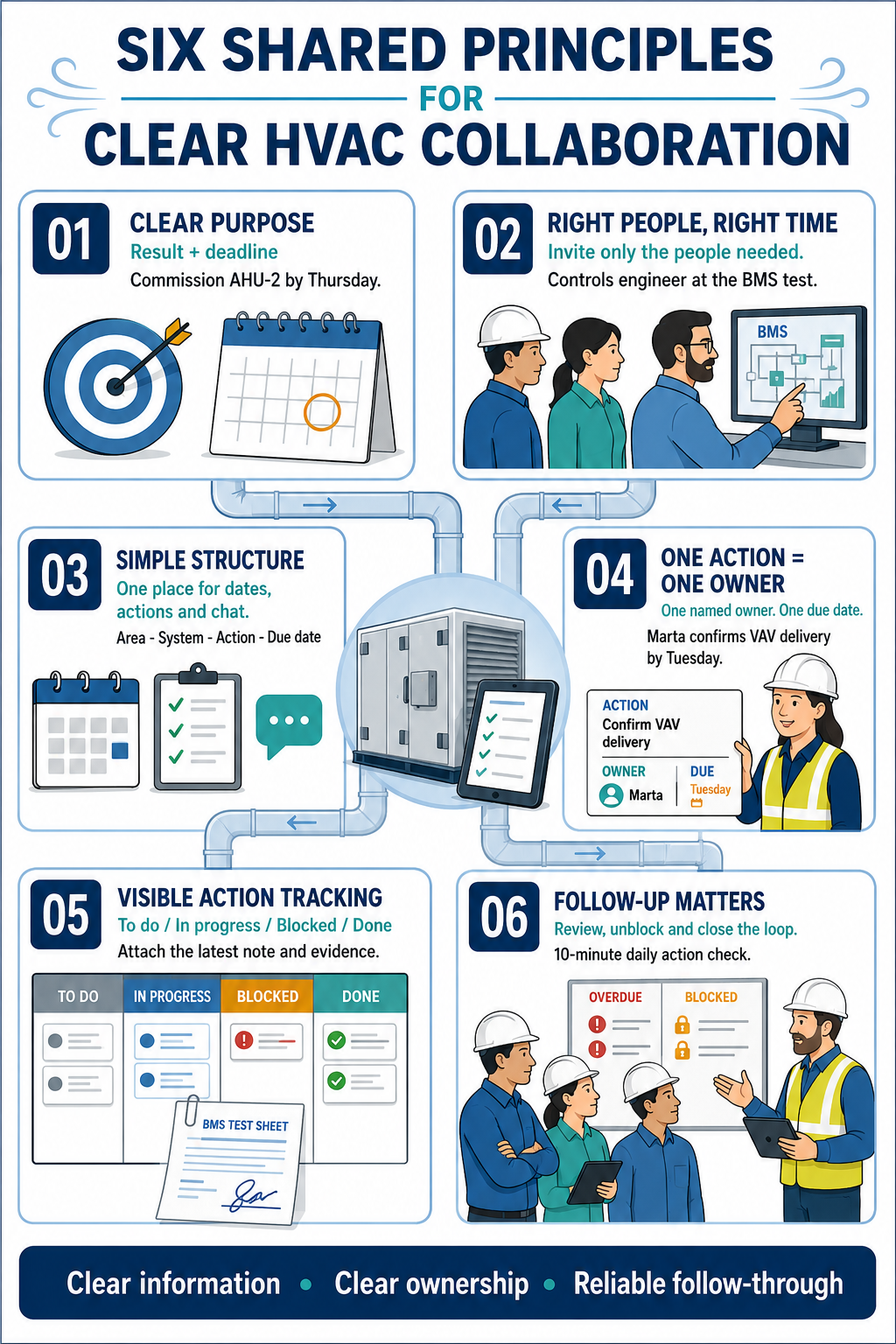
Meaning: State the result the team needs, not just the activity.
HVAC example: “Commission AHU-2 by Thursday so the Level 3 ceiling can close on Friday.”
Meaning: Include the people who can decide, provide information or complete the work - when their input is needed.
HVAC example: Invite the controls engineer to the BMS point-to-point test, not every general progress meeting.
Meaning: Agree one easy place for dates, one for actions and one for quick discussion.
HVAC example: The shared calendar holds shutdowns and inspections; the task list holds actions; the project chat handles short coordination questions.
Simple tool cue: Keep naming consistent: Area - System - Action - Due date.
Meaning: Give each action to one named person. Others may support, but ownership is never shared or unclear.
HVAC example: “Marta - confirm the VAV controller delivery date by 15:00 Tuesday.” The supplier and site manager can be followers, but Marta owns the update.
Meaning: Record actions where the team can see the current status, latest note and evidence of completion.
HVAC example: The condensate drain test moves from To do to In progress to Done, with the signed test sheet attached.
Meaning: Review open actions, unblock delays and close the loop. A recorded task is useful only when someone checks it.
HVAC example: At the daily 10-minute coordination check, the supervisor reviews overdue and blocked items before discussing new work.
| Action | Owner | Due | Status | Latest update / evidence |
|---|---|---|---|---|
| Confirm AHU-2 power available for commissioning | Elena | Thu 14:00 | In progress | DB energisation booked; photo to be added after test |
Before ending any meeting, ask: What is the action? Who owns it? When is it due? Where will we track it?
An HVAC company is installing a new heating and ventilation system in a medium-sized office building. The project requires close coordination between the project managers, on-site technicians, electrical subcontractor, and equipment supplier.
During the early stages, several coordination problems emerge:
The project manager recognises that ineffective coordination is increasing costs, reducing productivity, and putting the programme at risk. To bring the project back on track, the team introduces three practical collaboration techniques.
Before work continues, the project team holds a start-up workshop to:
The workshop establishes a shared understanding of the work, responsibilities, and programme.
The project manager, site supervisor, subcontractor, and supplier hold a short weekly meeting to:
For example, when the supplier reports a delay to a ductwork delivery, the team adjusts the installation sequence and completes other planned work. This prevents the loss of two working days.
The site team holds a ten-minute meeting each morning to confirm:
During one stand-up, the team discovers that electrical containment is obstructing an equipment lifting route. The electrical subcontractor relocates it before the delivery arrives, avoiding disruption and delay.
These collaboration techniques lead to:
These benefits depend on consistent follow-through. If actions are not recorded, assigned, updated, and reviewed, coordination problems can quickly return.
Key lesson: Simple meetings and digital tools are effective only when every action has a clear owner, deadline, and confirmed outcome.
An HVAC company was appointed to install and commission new systems in a refurbished healthcare facility.
This leads to confusion, rework, and time wasted searching for the correct information.
The team identified several documentation issues:
These problems increased the risk of installation errors, unsuccessful compliance checks, and delays to final handover.
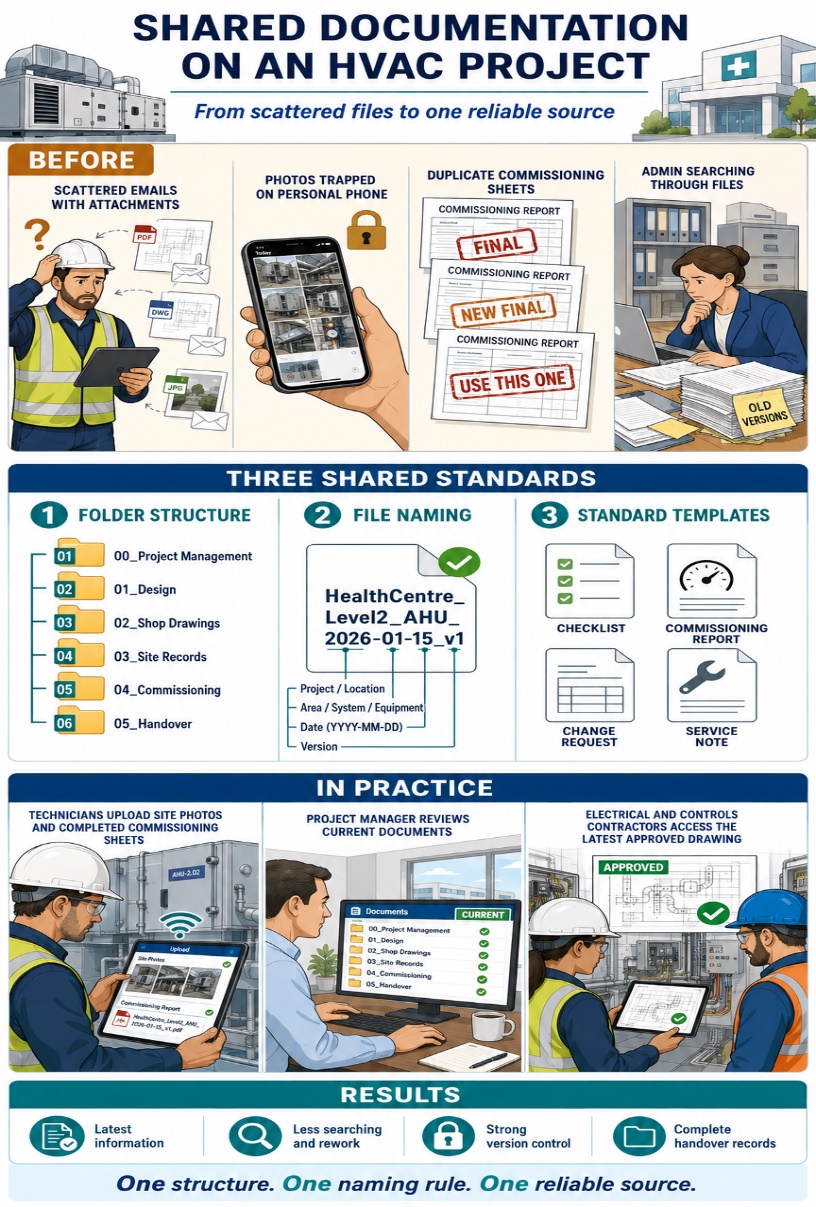
The company introduced a shared cloud-based document system supported by three clear standards.
All team members used the same six project folders:
The numbered structure made information quicker to locate and provided a consistent format that could be reused across future projects.
The team adopted a standard naming convention:
For example:
This allowed users to identify each document’s project, location, purpose, date, and version without opening the file. Superseded documents were archived so that only the current approved version remained in the active folder.
The company introduced common templates for:
Each template included the required details relating to the project, location, equipment, inspection, approval, and completion status. This improved consistency and reduced the risk of important information being omitted.
Technicians uploaded installation photos, completed checklists, and commissioning records directly from site. The project manager reviewed and updated documents in real time, while the office administrator checked that files were correctly named and stored. Electrical and controls contractors used the same system to access current drawings and submit testing information.
This provided everyone with access to the latest approved information, regardless of their location.
The shared documentation system reduced the time spent searching for files, strengthened version control, and provided the site and office teams with one reliable source of project information. Handover records were compiled throughout the project rather than collected at the end, making the final compliance review faster and more efficient.
Key lesson: Effective document control requires a logical folder structure, consistent file names, standard templates, and shared responsibility.
Task boards and trackers help HVAC teams organise work, monitor actions, and improve project coordination.
Consider how you currently organise, prioritise, and monitor your work.
HVAC example: A technician may use a handwritten list to record VAV units awaiting testing. A digital task board could show which units are To do, In progress, Blocked, or Done.
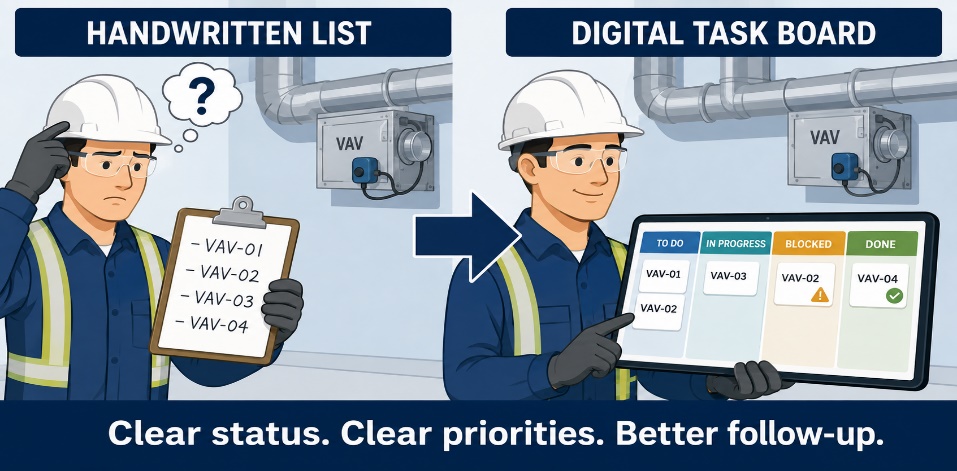
Consider how a simple tracker could help you work more effectively.
HVAC example: A technician marks an AHU commissioning task as Blocked and records that permanent electrical power is required. The cause of the delay is immediately visible, reducing the need for repeated calls or messages.
Consider what would make the tool practical during a normal working day.
A task board must be quick and simple to update on site. If the process is time-consuming or unclear, team members are less likely to keep the information current.
Consider how a shared task board could improve coordination between project managers, technicians, suppliers, and subcontractors.
HVAC example: The board shows that ductwork installation cannot begin until the ceiling supports have been approved. The project manager assigns the approval action to one person and monitors the agreed deadline.
Consider whether all team members can access the same current information.
HVAC example: A pressure test is marked as Done, and the signed test sheet is attached to the task. The project manager and commissioning team can review the evidence without asking the technician to resend it.
Consider how the team could use the board in a consistent and reliable way.
A simple task standard could include:
Identify one practical way you could use a task board or tracker on your next HVAC project.
Effective HVAC collaboration depends on communicating the right information to the right people, using the most appropriate channel.
Each communication channel has a specific purpose, benefit, and risk.
| Channel | Best used for | Main risk |
|---|---|---|
| Face-to-face or phone | Urgent issues, safety concerns, complex discussions, and immediate clarification | Important decisions may not be recorded |
| Messaging apps | Quick updates, short questions, delivery alerts, and day-to-day coordination | Information can become buried or overlooked |
| Digital project tools | Actions, deadlines, changes, approvals, progress updates, and supporting evidence | Information becomes unreliable if it is not updated consistently |
HVAC example: A technician identifies a clash between ductwork and electrical containment. The technician raises the issue directly with the electrical supervisor, then records the agreed action, named owner, deadline, and supporting photograph in the project tracker.
Information is exchanged through private conversations, calls, or individual messages.
Likely result: Key people may be missed, responsibilities remain unclear, and delays become more likely.
Information is available across emails, chats, and folders, but there are no agreed rules for storing or updating it.
Likely result: Updates are difficult to locate, actions may be overlooked, and teams risk working from outdated information.
The team uses agreed communication channels, shared file locations, standard task statuses, named owners, and clear deadlines.
Likely result: Current information is visible, responsibilities are clear, and risks can be identified and resolved earlier.
Before choosing a communication channel, consider:
Key lesson: Use conversations and messages for speed and immediate coordination, but record important decisions, responsibilities, and actions in the shared project system.